The first Kindle came out ~3 years before the iPad. In a parallel universe, the new Kindle Fire is still the Kindle tablet we'd be getting now if Apple hadn't ever made the iPad at all. That's a huge difference compared to everybody else who are just making iPad copies.
It's interesting that Apple and Amazon both started with simple devices for specific types of media, books and music, and grew out to encompass the rest.
I almost feel sorry for all the other Android tablet companies, who's going to buy one now, knowing the Fire is coming?
Friday, September 30, 2011

Friday, September 16, 2011
Batteries Forever
Reading about how improvements in computers (twice as efficient every 18 months) have made batteries last longer & longer. That just gets cooler.
Right now, with wireless off, my Kindle 3 works for at least a month between charges. So in about 6 years if the pace continues, the Kindle might last a YEAR on one charge. And at that point, they can put a little solar cell like the little solar calculators have...it might never need to be plugged in at all.
Similar for the iPad or iPhone of the future, Apple could hide solar cells around the screen, or even just in the Apple shape on the back & you'd rarely if ever have to plug it in. (Though an iPhone in a pocket gets less light, so might need to leave it on a desk :)
Right now, with wireless off, my Kindle 3 works for at least a month between charges. So in about 6 years if the pace continues, the Kindle might last a YEAR on one charge. And at that point, they can put a little solar cell like the little solar calculators have...it might never need to be plugged in at all.
Similar for the iPad or iPhone of the future, Apple could hide solar cells around the screen, or even just in the Apple shape on the back & you'd rarely if ever have to plug it in. (Though an iPhone in a pocket gets less light, so might need to leave it on a desk :)
Friday, September 9, 2011
We told you so.
Another year, another bar, another iPhone prototype. Apple, you shouldn't have rejected it:
http://michael.burford.net/2010/05/lost-in-bar-appdenied.html
http://michael.burford.net/2010/05/lost-in-bar-appdenied.html
Wednesday, September 7, 2011
iPhone 5 screens #2
Hmm, various rumors floating around about the next iPhone.
If it really does get a 4" screen, especially as rumors have said it's wider, maybe Apple will increase the resolution. If my math is right you can do about a 3.8" screen at 640x960 and have it be above the 300dpi Retina number.
 4" is bigger than that. BUT if you increase the resolution to 1024x768 as well, it would work and have a high enough dpi at the bigger size. A 640x960 inner section would run every iPhone app as-is, much like how the iPad runs them today. If the pixels are the same size, apps would look just the same. There would be a little more bezel area than on the current iPhone, but not bad. As apps are updated they would use the full screen.
The picture shows black "wasted" space for un-updated apps in the bigger screen. If the black goes closer to the physical edge of the iPhone, it's only a little more space than the bezel around the current iPhone 4. And might even be less than in the 3GS if you count to the outside of the curved edges.
In the short term, it's a bit of a pain for programmers. But in the long term, and these are platforms that will be around for many more years or decades, iPhone and iPad then have the same base resolution going forward. That would be a huge deal. One set of graphics to cover both devices.
If it really does get a 4" screen, especially as rumors have said it's wider, maybe Apple will increase the resolution. If my math is right you can do about a 3.8" screen at 640x960 and have it be above the 300dpi Retina number.

The picture shows black "wasted" space for un-updated apps in the bigger screen. If the black goes closer to the physical edge of the iPhone, it's only a little more space than the bezel around the current iPhone 4. And might even be less than in the 3GS if you count to the outside of the curved edges.
In the short term, it's a bit of a pain for programmers. But in the long term, and these are platforms that will be around for many more years or decades, iPhone and iPad then have the same base resolution going forward. That would be a huge deal. One set of graphics to cover both devices.
Sunday, June 19, 2011
Tablet Idiots (except Apple.)
At Best Buy today, I checked out the various tablets.
All of them had a massive anti-theft device attached to the bottom. Like a big plastic half a tennis ball glued to them. Except Apple's iPads--those had an anti-theft thing like a little disc the size of 3 stacked pennies.
For a device you're supposed to HOLD, any weight advantage those other tablets have by being smaller & plastic is lost by their big attachments.
All of them had a massive anti-theft device attached to the bottom. Like a big plastic half a tennis ball glued to them. Except Apple's iPads--those had an anti-theft thing like a little disc the size of 3 stacked pennies.
For a device you're supposed to HOLD, any weight advantage those other tablets have by being smaller & plastic is lost by their big attachments.
Friday, May 27, 2011
How iOS 5 Widgets Could Work
My thought is they would fit in among the springboard icons, and moving them would have the icons flow around the widget. Hopefully several sizes are allowed. 2x1, 2x2, 4x2, etc.
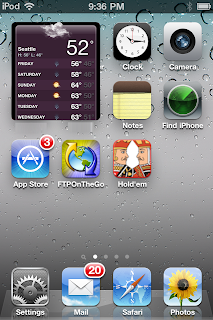 In that space, the app runs and show its information. This 2x2 one is 266x294 pixels on the iPhone 4 (or 133x147 on non-retina iPhones). Purely shrinking down the weather app's screen to fit, it works. Designed properly with a bigger font and such would look awesome.
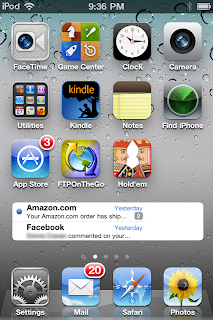 A wider 4x1 size, perfect for showing the most recent email messages.
Two 4x2 sized ones would fill a screen--email on top, Facebook or Twitter below.
In edit mode (wiggling icons) those that allowed could be resized by dragging an indicator in the lower right corner. Simply drag the widget's corner to be as tall or short as you want. And a normal (X) in the upper left corner to delete.
Some would be interactive, tap the Music one (that shows the album artwork as it's default!) and there would be pause/play, next & previous buttons.
Some might just open the app--like Notes would show the most recent note's text, but tapping opens the Notes app.
We'll find out on the 6th how close this might be.
 In that space, the app runs and show its information. This 2x2 one is 266x294 pixels on the iPhone 4 (or 133x147 on non-retina iPhones). Purely shrinking down the weather app's screen to fit, it works. Designed properly with a bigger font and such would look awesome.
 A wider 4x1 size, perfect for showing the most recent email messages.
 Two 4x2 sized ones would fill a screen--email on top, Facebook or Twitter below.
In edit mode (wiggling icons) those that allowed could be resized by dragging an indicator in the lower right corner. Simply drag the widget's corner to be as tall or short as you want. And a normal (X) in the upper left corner to delete.
Tap to activate (a glow effect around the border & fade the rest--like when you open a folder/group?), then allow scrolling and interacting with the widget-app. Tap outside to return to normal.
Some would be interactive, tap the Music one (that shows the album artwork as it's default!) and there would be pause/play, next & previous buttons.
Some might just open the app--like Notes would show the most recent note's text, but tapping opens the Notes app.
We'll find out on the 6th how close this might be.
Sunday, May 15, 2011
iPhone 5
If Apple really does an edge-to-edge screen on the iPhone 5, which makes sense, I wonder which of the ways they will do it:
1) Keep the screen identical to what it is now, and shrink the rest of the phone around it. Cool because it's a smaller overall iPhone, but doesn't give a bigger screen.
2) Keep the current 640x960 screen resolution and just stretch it a little to be a bigger screen. Apps won't have to change at all, everything would be slightly bigger. No changes to apps is a huge plus, and likely is a major reason to do it this way. But this lowers the dots per inch. If my math is right, you can do up to a 3.8 inch screen at 640x960 and that's just above the magical 300dpi "Retina" resolution.
3) Increase the resolution of the screen, so the center 640x960 part is the same size as before, but now more pixels around that. Existing apps could run as-is in an inner area of the screen, really looking exactly as they do now with a black/white bevel around the edge of the screen. Updated apps would use the bigger resolution and go edge-to-edge.
There are even a couple interesting new resolutions: 1024x768 is the iPad resolution and 1280x720 is one of the HD video resolutions. Unfortunately, the HD one may be too tall. Stretching the screen to fill the space on the current iPhone 4 looks like about 40 pixels on the left and right would do it. That would be 720 wide--the nice HD video number, but adding the same on top and bottom is only 1040, quite a bit short of widescreen HD.
The iPad one is easier to reach, with a slightly wider iPhone screen. But really the device would not be much wider than when it's in some of the cases now, or the width of earlier generation iPhones & iPod touches (taking into account the outer edge of the curved 3G/3GS ones)
I'm going to guess #2, because of the big advantage of keeping the resolution the same for developers.
1) Keep the screen identical to what it is now, and shrink the rest of the phone around it. Cool because it's a smaller overall iPhone, but doesn't give a bigger screen.
2) Keep the current 640x960 screen resolution and just stretch it a little to be a bigger screen. Apps won't have to change at all, everything would be slightly bigger. No changes to apps is a huge plus, and likely is a major reason to do it this way. But this lowers the dots per inch. If my math is right, you can do up to a 3.8 inch screen at 640x960 and that's just above the magical 300dpi "Retina" resolution.
3) Increase the resolution of the screen, so the center 640x960 part is the same size as before, but now more pixels around that. Existing apps could run as-is in an inner area of the screen, really looking exactly as they do now with a black/white bevel around the edge of the screen. Updated apps would use the bigger resolution and go edge-to-edge.
There are even a couple interesting new resolutions: 1024x768 is the iPad resolution and 1280x720 is one of the HD video resolutions. Unfortunately, the HD one may be too tall. Stretching the screen to fill the space on the current iPhone 4 looks like about 40 pixels on the left and right would do it. That would be 720 wide--the nice HD video number, but adding the same on top and bottom is only 1040, quite a bit short of widescreen HD.
The iPad one is easier to reach, with a slightly wider iPhone screen. But really the device would not be much wider than when it's in some of the cases now, or the width of earlier generation iPhones & iPod touches (taking into account the outer edge of the curved 3G/3GS ones)
I'm going to guess #2, because of the big advantage of keeping the resolution the same for developers.
Subscribe to:
Posts (Atom)